
TheDeposit Management inportier®VISION allows you to issue certain keys only upon deposit of a security deposit. This can be particularly helpful to ensure the return of valuable keys.
Procedure:
Select key:
Open the key list in the moduleAdministration by clicking the buttonKeys.
Search for key:
Use the search function to find the desired key.
3.
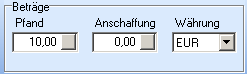
Set deposit amount:
Enter the deposit amount in the corresponding field that must be deposited when the key is issued.
Activate deposit:
Once the deposit amount is entered, the key can only be issued upon payment of this deposit.
Benefits of deposit management:
Security: Keys are not issued without a guarantee of return.
Management: You maintain an overview of outstanding keys and deposit amounts.
This function helps ensure key returns and provides companies with an additional layer of protection when managing valuable keys.