portier Vision has no backup function you can start from inside the program. If your database runs on Firebird, the batch script below backs it up every night in the background.
If your database runs on Microsoft SQL Server, this script does not help. gbak.exe backs up Firebird only. Your SQL Server is backed up with its own tools, normally a maintenance plan or a SQL Server Agent job. portier ships nothing for that, it belongs to whoever looks after your database server.
Firebird is installed and gbak.exe sits in the Firebird folder.
You have write permissions on the backup folder.
You know the SYSDBA password of your Firebird installation.
Windows Task Scheduler is available.
If the database sits on a server, set up the script and the task on that server, not on a workstation.
Do not guess the path. It is in portier Vision Companion.
Open the Companion. On the sign-in screen, Open database configurator takes you straight there. After signing in, use the Database Configuration tab.
Database Type reads Firebird.
Note the value in Database Path. It goes into the DBPATH line.
If Host is not localhost, the database sits on another machine. Set the backup up there.
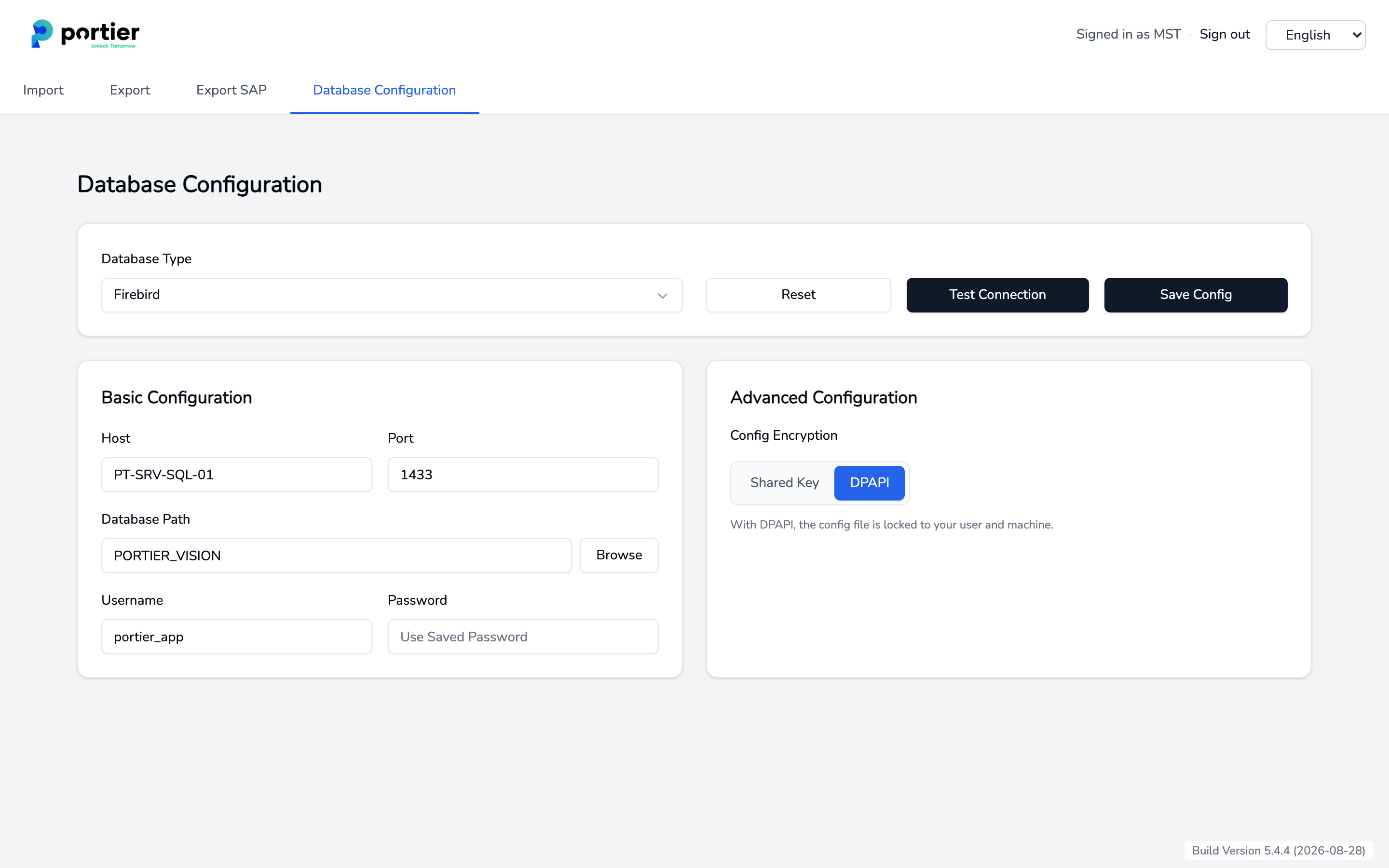
The value in the Database Path field goes into the DBPATH line of the script.
Save the text below as C:\portier\backup\portier_backup.bat. Remember this path exactly. The scheduled task has to point at the same file.
@echo off
setlocal EnableExtensions EnableDelayedExpansion
:: ================== Settings ==================
set "FBPATH=C:\Program Files (x86)\Firebird\Firebird_4_0\gbak.exe"
set "DBPATH=C:\portier\vision5\PORTIERVISION.GDB"
set "BKPATH=C:\portier\backup"
set "USER=SYSDBA"
set "PASS=YOUR_SYSDBA_PASSWORD"
set "RETENTION_DAYS_BACKUPS=14"
set "RETENTION_DAYS_LOGS=30"
:: ==============================================
:: --- Pre-checks & create folder ---
if not exist "%BKPATH%" mkdir "%BKPATH%" 2>nul
if not exist "%BKPATH%" exit /b 2
if not exist "%DBPATH%" exit /b 3
if not exist "%FBPATH%" exit /b 4
:: --- Timestamp for unique filenames ---
for /f %%i in ('powershell -NoProfile -Command "(Get-Date).ToString(\"yyyy-MM-dd_HH-mm-ss\")"') do set "STAMP=%%i"
set "BKFILE=%BKPATH%\portier_%STAMP%.fbk"
set "LOGFILE=%BKPATH%\backup_log_%STAMP%.txt"
(
echo ==================================================
echo Backup started: %DATE% %TIME%
echo gbak  : "%FBPATH%"
echo DB    : "%DBPATH%"
echo Target: "%BKFILE%"
echo ==================================================
) >> "%LOGFILE%"
:: --- Execute backup silently ---
"%FBPATH%" -b -v -user %USER% -pas %PASS% "%DBPATH%" "%BKFILE%" >> "%LOGFILE%" 2>&1
set "RC=%ERRORLEVEL%"
if "%RC%"=="0" (
echo [%DATE% %TIME%] Backup OK >> "%LOGFILE%"
) else (
echo [%DATE% %TIME%] ERROR, Code %RC% >> "%LOGFILE%"
)
:: --- Cleanup old backups ---
echo. >> "%LOGFILE%"
echo [%DATE% %TIME%] Cleaning: *.fbk older than %RETENTION_DAYS_BACKUPS% days >> "%LOGFILE%"
forfiles /p "%BKPATH%" /m *.fbk /d -%RETENTION_DAYS_BACKUPS% /c "cmd /c del /q /f @path" 2>> "%LOGFILE%"
:: --- Cleanup old logs ---
echo [%DATE% %TIME%] Cleaning: Logs older than %RETENTION_DAYS_LOGS% days >> "%LOGFILE%"
forfiles /p "%BKPATH%" /m backup_log_*.txt /d -%RETENTION_DAYS_LOGS% /c "cmd /c del /q /f @path" 2>> "%LOGFILE%"
echo ================================================== >> "%LOGFILE%"
echo Backup completed. >> "%LOGFILE%"
endlocal & exit /b %RC%Only the block at the top changes.
FBPATH: path to gbak.exe. Check it in Explorer, the Firebird folder is named differently per version.
DBPATH: the value from Database Path, step 1.
BKPATH: folder for backups and logs.
PASS: your SYSDBA password.
RETENTION_DAYS_BACKUPS and RETENTION_DAYS_LOGS: retention in days.
About the password. masterkey is the default password of every fresh Firebird installation. If it is still in place on your system, change it before you go any further. The password sits in this file in clear text, so restrict permissions on C:\portier\backup to the account the task runs under.
Start the file with a double click. No window opens. Then look in C:\portier\backup. Two new files must be there, a .fbk and a log. If they are missing, check the return codes below.
Open Task Scheduler (taskschd.msc).
Choose Create Task.
Under General: name it portier Firebird Backup, tick Run with highest privileges and Run whether user is logged on or not.
Under Triggers: new, daily, 02:00.
Under Actions: start a program, C:\portier\backup\portier_backup.bat. Character for character the same path as in step 2.
Save, then right-click the task and choose Run.
A typo in step 5 goes unnoticed. If the task points at a file that is not there, it starts at the scheduled time, does nothing and reports nothing on screen. No backup is written and no log either, because the script never runs. The only hint sits in the Last Run Result column. So on the morning after the first scheduled run, check whether the backup folder holds a .fbk dated today.
A backup that has never been restored is a guess. Test once after setup, then once or twice a year.
"C:\Program Files (x86)\Firebird\Firebird_4_0\gbak.exe" -c -user SYSDBA -pas YOUR_SYSDBA_PASSWORD "C:\portier\backup\portier_2026-08-28_02-00-01.fbk" "C:\portier\backup\verify.fdb"Take the newest .fbk from the backup folder.
-c creates a new database. The target is a test file. Never point it at PORTIERVISION.GDB.
The command has to finish without an error, and verify.fdb has to be roughly the size of your live database.
Delete verify.fdb afterwards.
If the command fails, your backup is not usable. Sort that out before you need it.
Value | Meaning |
|---|---|
0 | Backup successful |
2 | Backup folder could not be created, check BKPATH |
3 | Database not found, check DBPATH |
4 | gbak.exe not found, check FBPATH |
any other | Return code from gbak.exe, details are in the log |
Every run writes its own timestamped log. A good run looks like this:
==================================================
Backup started: 13.10.2025 07:00:01
gbak  : "C:\Program Files (x86)\Firebird\Firebird_4_0\gbak.exe"
DB    : "C:\portier\vision5\PORTIERVISION.GDB"
Target: "C:\portier\backup\portier_2025-10-13_07-00-01.fbk"
==================================================
gbak: creating file C:\portier\backup\portier_2025-10-13_07-00-01.fbk
gbak: writing data...
gbak: finishing, closing, and going home
[13.10.2025 07:01:12] Backup OKIt gets nothing off the machine. A backup on the same disk as the database is gone with the disk. Copy the .fbk to a second medium as well.
It does not back up Microsoft SQL Server.
It does not answer who notices tomorrow morning that the backup did not happen.
One last point. Never copy PORTIERVISION.GDB with Explorer while the database is running, the copy is unusable. gbak is allowed to back up during operation, Vision can stay open.